Reflection and development process

In this class, I have learned fundamental knowledge of interaction and user-centered design from 3 different parts, which are the introduction, task, and site.

The introduction part helps me get knowledge of what is interaction and user-centered design. The task part is to create prototypes of an app, practice the process of interaction design. The site is the interaction design, and the articles and blogs are my reflection and summary of the whole learning process.

The site

When I started, I wanted to make my blog into a website that introduced me and my work, as a digital design portfolio. It’s not just a diary on class learning. The fact is I’ve been working towards that during this semester. In order to achieve my goal, I made the following changes to my blog.

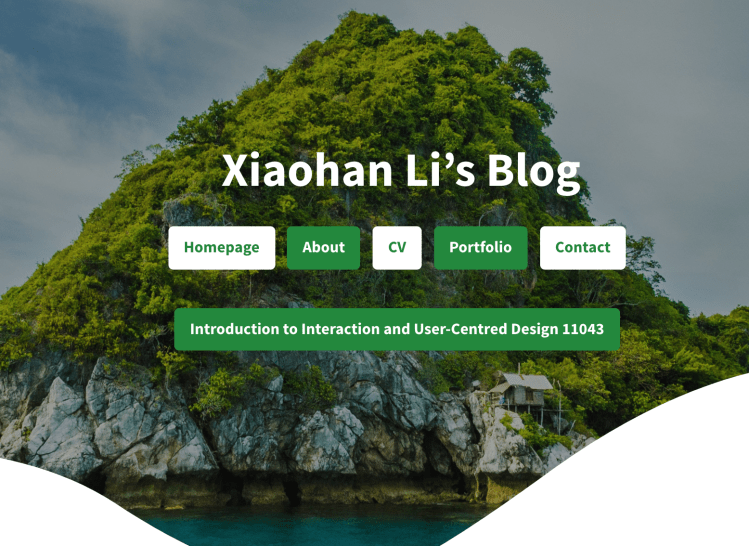
1 For the home page of my blog, I add Homepage, About, CV, Portfolio, and contact button which can link to those pages to know about me, and see my design works.

2 And I also add those function buttons at About, CV, Portfolio, and contact pages.

3 At the bottom of my homepage, I added links to the home pages of my social media site.

4 The recent article is shown below the top part.
Style and theme

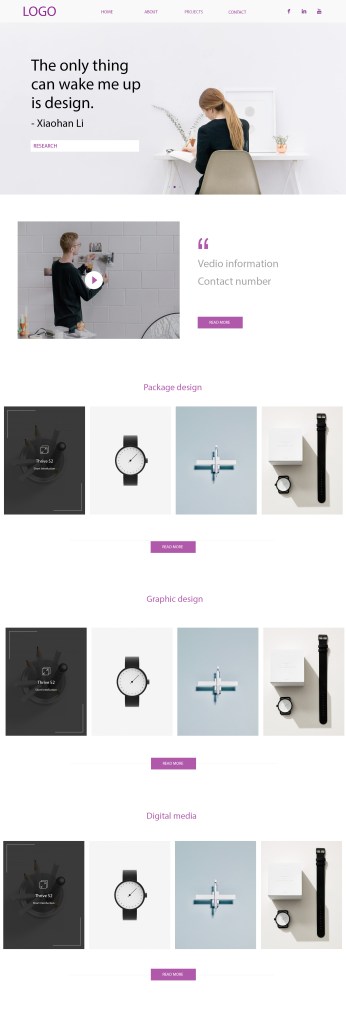
I generally design the layout style as simple and clean as I planned before. I did a sketch for my blog version before, which is different from the layout of the webpage right now. The main reasons are i still can not use WordPress very well and the options in WordPress are limited. For example, I planned to put the About, CV, Portfolio, and contact buttons on the topic of the webpage. But create the navigation bar in WordPress is not suited for the blog page I create. I can put my name or logo on that part only. I need to keep the study of how to use the options well in WordPress.

I planned to create a 4-5 section on my blog’s home page. Each section has 4 square buttons – contains a short brief image of each section work. But I find that does not work for the article. There is no way for people to know the content of an article just by looking at a picture. That is the reason why I changed my mind, show the short introduction and the title of articles on the homepage, instead of using an image to represent the title.

Target audience

The target audience I planned they are design students, designers, and HR in design companies. Based on what I did for my blog, I think they roughly match. Design students and designers can find what they want by reading my articles and portfolio page. I think the ‘ HR in design companies ‘ needs to be redefined a little bit. The reason why I set this up as my target audience is that I want to have an opportunity to get a job after they read my blog. But during this semester, especially after I got a job as an intern. I realized that there are not only design companies need designers. Other industries need designers too, For example, marketing companies need designers to design some posters and banners for their brand to support their marketing. As a result, I want to change ‘HR in design companies’ to ‘HR in Companies that need designers’ and change the persona at the same time.

Another thing I changed is I didn’t put my logo on the top. Because I planning to change the target audiences from HR in design companies to HR in Companies that need designers. They might hire me after reading my blog. If I put the logo on my website. It looks like I have been already working for other design company, or I have my own design studio. My logo now is shown on my portfolio page, as one of my design works. That is a good way for my other target audiences, design students, and designers.
Hifi-prototyping and reflection

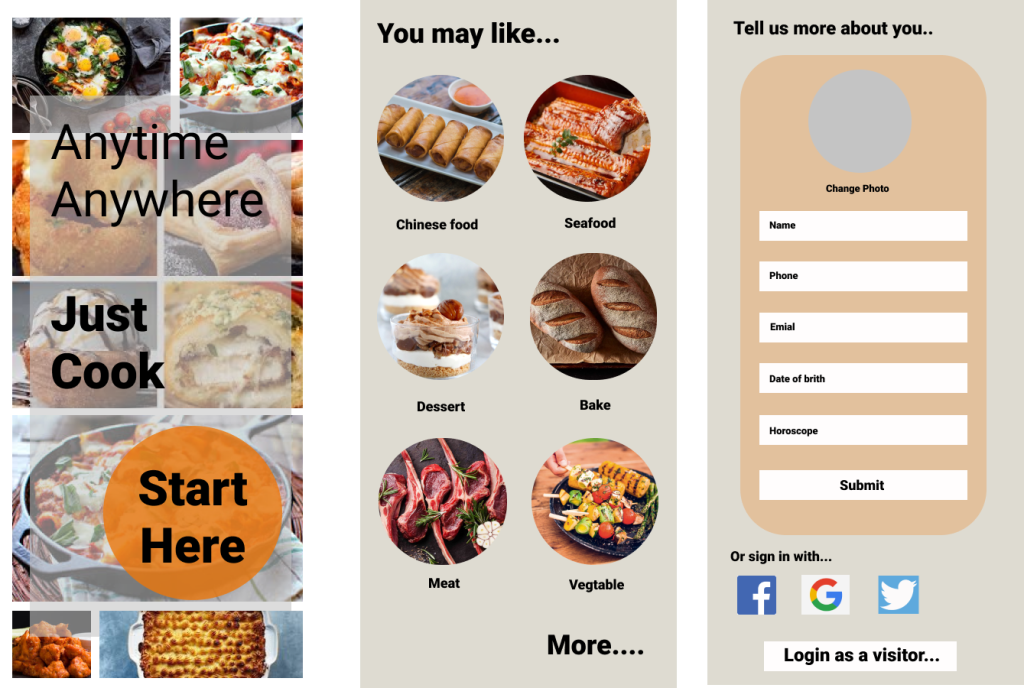
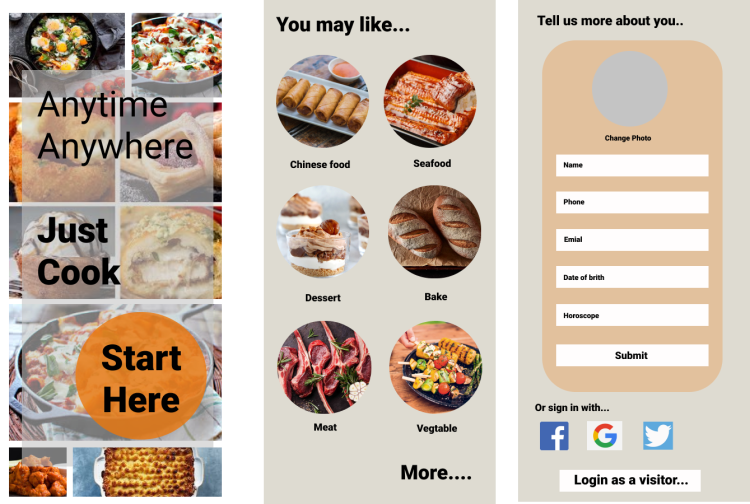
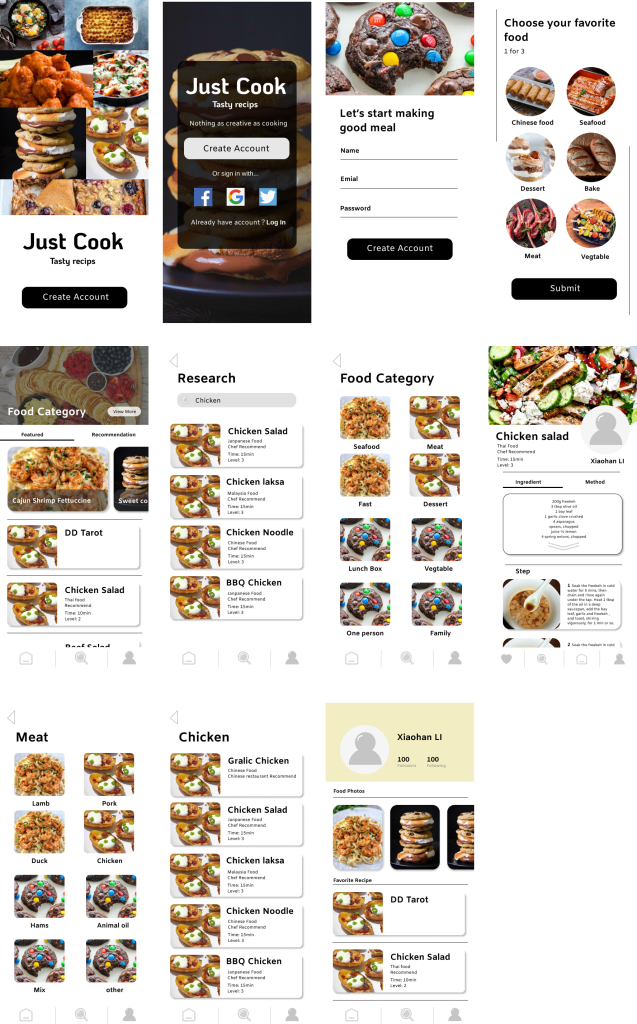
The task that I did is in this semester is to create prototypes and test after for the tasty recipe‘s app. I made my low-fi and high-fi prototype during week 6 to week 11. According to the feedback I get from other people in W7-W8 on discussion form. I redesign and decide the final style of my App. The reflection of my low-fi prototype I have been already published in my blog, see Prototyping and reflection (Week 7)

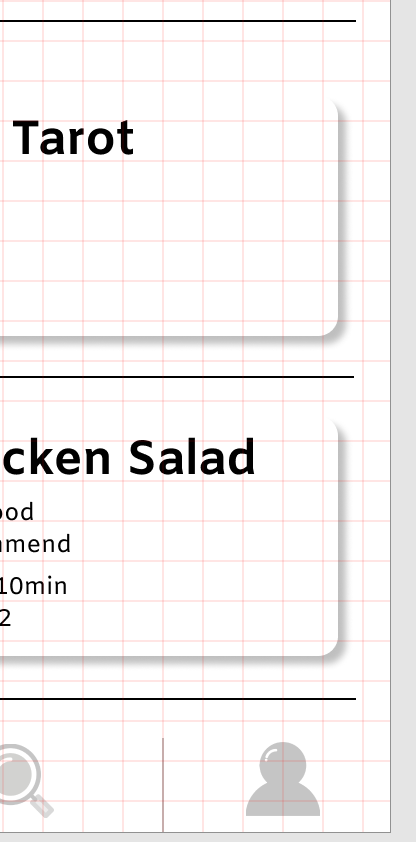
Today, The main thing I want to discuss is my developed and changed my Hifi-prototype.

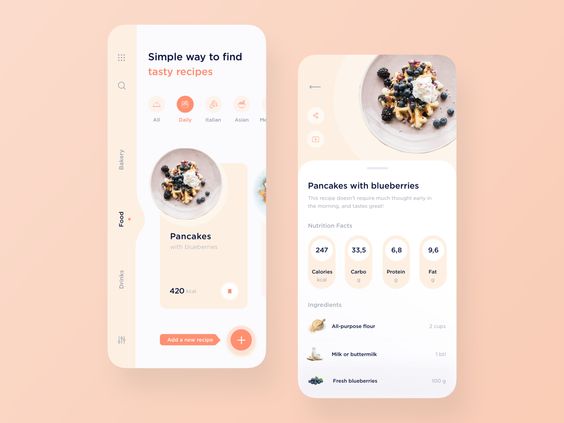
The old prototype I did in Figma

The feedback gives me 4 suggestions.
Firstly, One of the biggest mistakes I made before is I didn’t make the grid. The fact is some part is not clarity. Secondly, on the first page, words are not easy to read. Thirdly, on the last page, there’s something wrong with the logic of the layout. “Login form” should be showed after “sign in with social media” part. Fourthly, the “More” on the second page should be made more like a button.

Changes in design

1 I add one more page “sign in with social media”, between the page “started” to the page “login form”.

2 Created an “account” page as the user’s home page.

3 I decide to change my design style from 3 different parts, which are color, typeface, and button.

Color

For the color, I changed the main background color from gray to simple white. Firstly, the gray background doesn’t apply to a tasty recipe‘s app. Gray is an unemotional color. The color gray is subdued, quiet, and reserved. It does not stimulate, energize, rejuvenate, or excite. That is not fit the design style I made for my app. The design style of my tasty recipe’s is bright, nice, and simple, it can help highlight the food.

Reference: Empowered,d, The Color Gray, viewed by 27th April <https://www.empower-yourself-with-color-psychology.com/color-gray.html>

Typeface

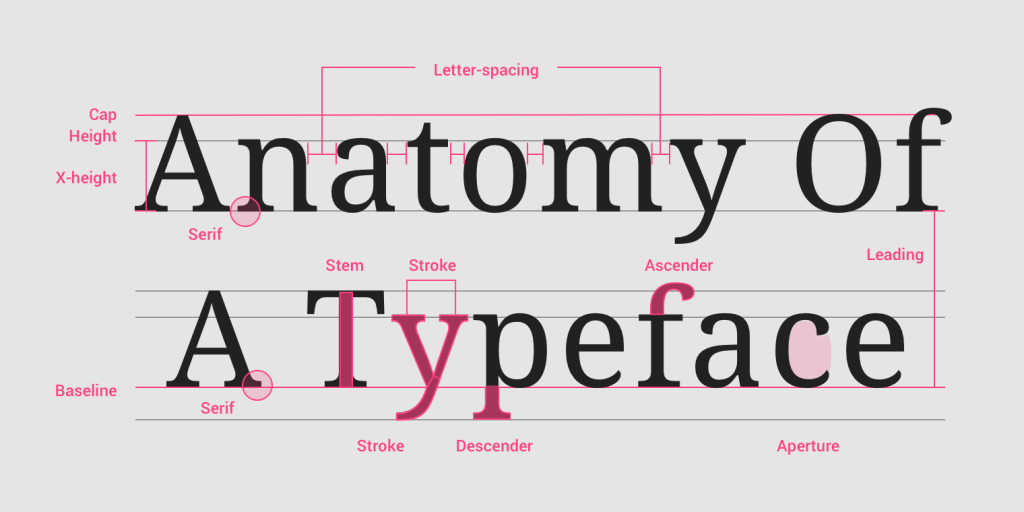
I used a much more bold font in my prototype before. Because I hope the bold can highlight the words. The fact is, if the entire page is in bold, it can not highlight anything and also make the whole page boring. I changed some bold text into a regular size.

Reference: Eugene,S, 2017, Guide to 10 font characteristics and their use in design, viewed by 27th April <https://medium.com/@eugenesadko/guide-to-10-font-characteristics-and-their-use-in-design-b0a07cc66f7>

Button

I shaded a lot of buttons, to make the whole page more realistic and modern. Use shadows combined with gradients and tone variations to show the depth.

Reference: Anastasia,K, 2018,Creating UI shadows that don’t suck, viewed by 27th April <https://medium.com/nyc-design/how-to-make-ui-shadows-that-dont-suck-53827f2f2cb>

The final prototype I did in Figma

Check out the latest version of my app here.

My experience of Using Figma(W12)

This is my first time to use Figma to finish my in-class task. Figma is a very convenient website for interaction design. Firstly, the users don’t need to download Figma – nearly all the functions can be used on the webpage and it is free. I began to use it without reading any information or introduction before. This is my usual style. I always like to start with nothing. I prefer to research and read some HOW page when I meet problems. As a designer, I know how to use Photoshop, Illustrator, Indesign, and other design software. I thought the basic function of using Figma might be similar to those design software I used before. Fortunately, I was right, Figma is very easy to use for the designer.

The main function in Figma, like Frame, is very similar to the illustrator. Figma is more suitable for interaction design. Figma provides me a lot of different screen sizes to choose from, So I don’t have to Google it. My favorite is the Grid for Figma. It is not like illustrator – Grid in illustrator will disappear within full-color background or image. When you create a full-color background or publish an image on Figma, the Grid is still clear to see to help you complete the following design.

Check out the latest version of my app here.

The problem when I use Figma is, I need to always remember to lock your frame, or it will easily ‘run around’ on the screen. There is no ‘pathfinder’ in Figma. For some icons’ make, I need to make it in illustrator by using ‘pathfinder’ at first, then export them to Figma.

Show Hotspot Hints in Figma

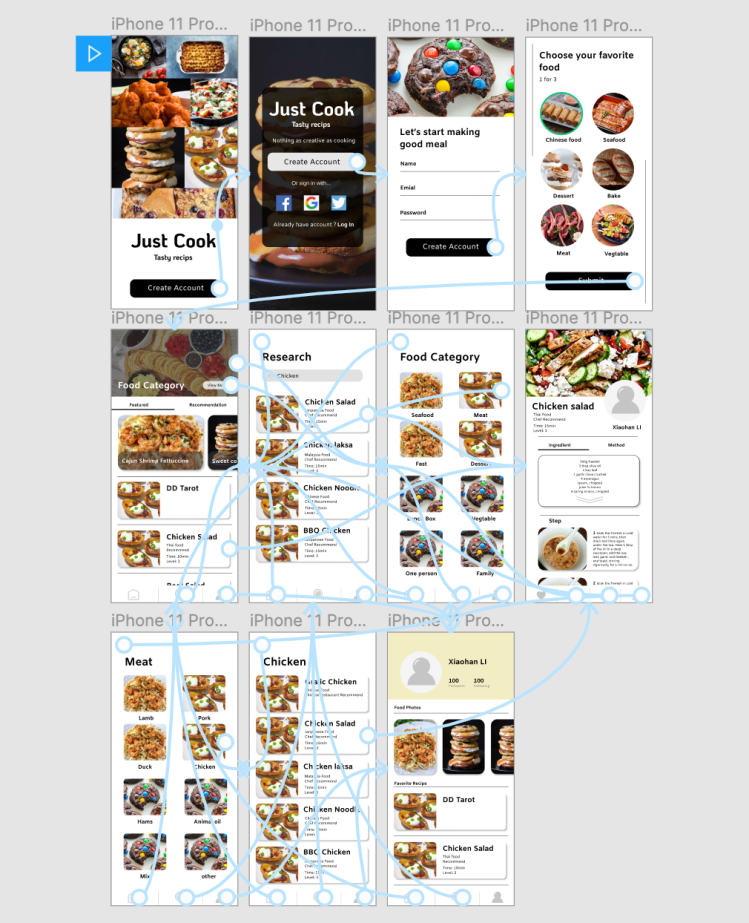
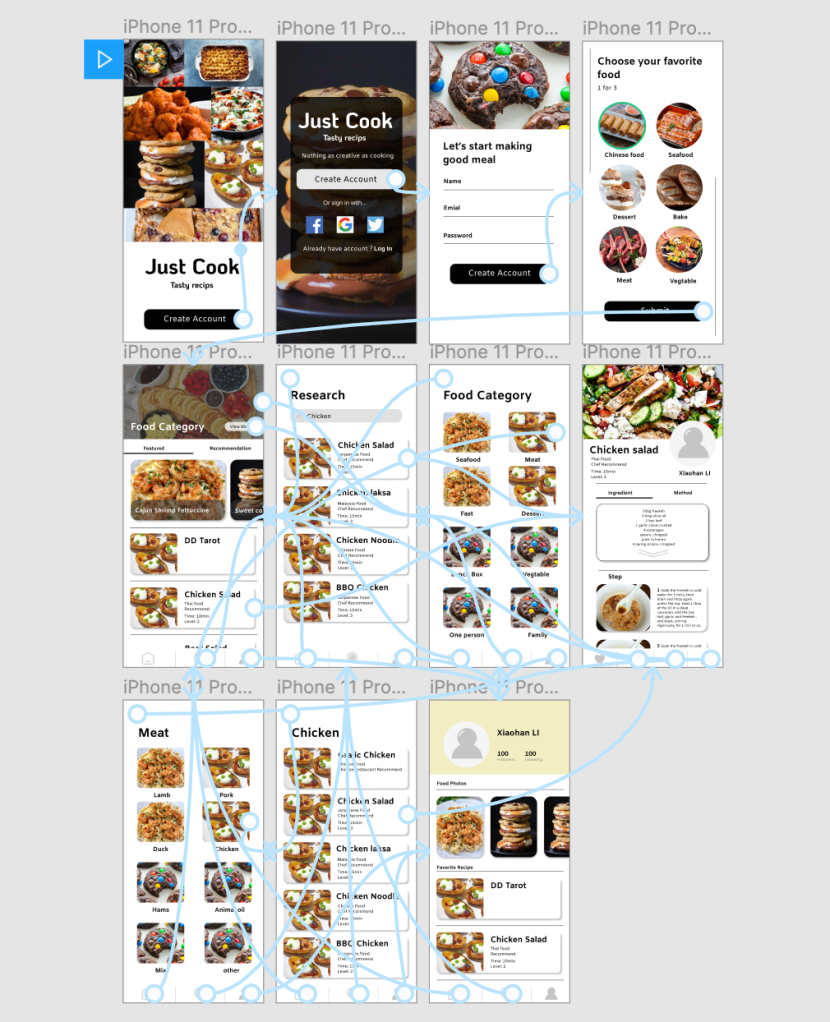
I used a very popular interactive online software before, called inVision. inVision also provides people to create a hotspot on the presentation page. I think the hotspot hints in Figma are more humanizing than inVision. In Figma, when you need to create hotspots, all page is clearly shown on one webpage, you can easily be connected with the blue line.

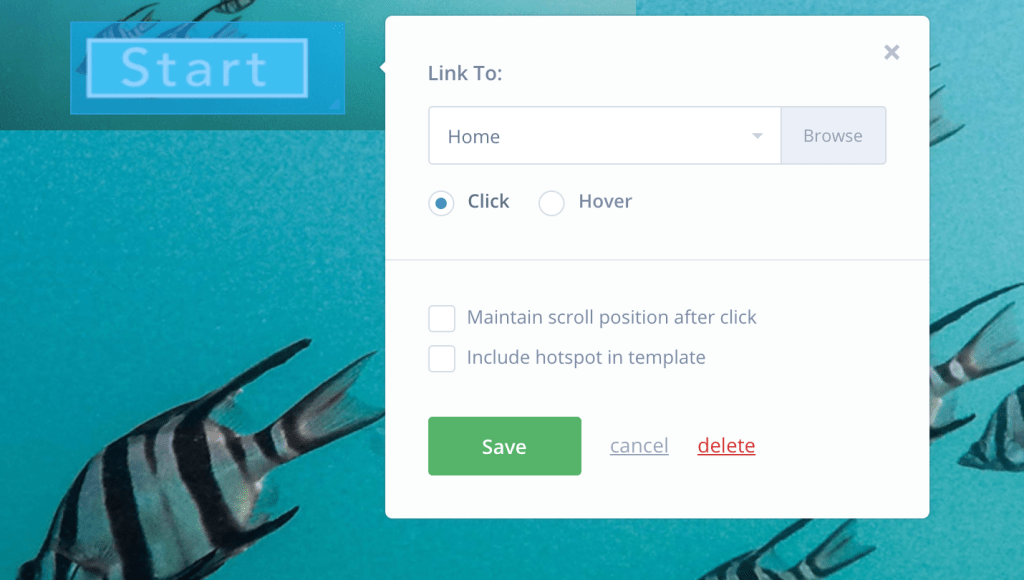
But in inVision, if you want to create hotspots, you must remember which is the page’s link you want to connect with.

However, in inVision, you can create a rectangle hotspot only. But in Figma, because you do the design on it, you can click the button whatever how is look like, and connect it to other pages.

Check out the presentation version of my app here.

Visual style and testing (W11)

This week, I’ve learned 2 things that can help me do better in UX design, which is visual style and testing. Firstly, there are 3 mains things are important in UX design visually, grid, typography, and color.

Grid

The grid I made in figma, that is Pixel grid: 20 px

What is Grid?

In design, the grid is a tool to help us ensure the organizing of the layout. It can help us easier to create a visual style and keep it in a different layout. Grid is widely used in a different area in design, like books, magazines, posters, webpage, and app. For example, when we were designing some app pages, some function buttons need to be placed in the same position on each page. It is hard for designer to placed it in to the right place without any grid.

There are many different types of girds, like Baseline grid, Column grid, Modular grid, Manuscript grid, Pixel grid, and Hierarchical grid.

 Reference: Steven, B, 2013,4 Reasons Why You Should Design With A Grid, viewed by 18th April <https://vanseodesign.com/web-design/why-grids/>

Why are grids important in design?

1 Keep the whole page look more Clarity and help users easier to find the right information which they are looking for.

2 Help the designer effectively adds a design element.

3 Using a grid can help designer ensure consistency across all sites

4 Gird make collaborative design becomes easy.

Reference: Andrew, W, 2018, Grids In Graphic Design: A Quick History, and 5 Amazing Tips, viewed by 18th April <https://trydesignlab.com/blog/grids-ui-ux-graphic-design-quick-history-5-amazing-tips/#5>

Typography

Typography is one of the most important part in UX design, Simply said, typography is craft of arranging text. The aim of typography is to make people feel comfortable and easy to read the words and image.

In UX design, the first things we need to think about the typography is the typeface. The designer should think about what is the end-user and the brand represents when choosing typefaces or fonts at first. After that, try to reflect this in typography.

Reference: Fredrik, F, 2018,It’s just text, how hard could it be? – Typography in UX ,viewed by 18th April <https://www.testbirds.com/blog/its-just-text-how-hard-could-it-be-typography-in-ux/>

Color

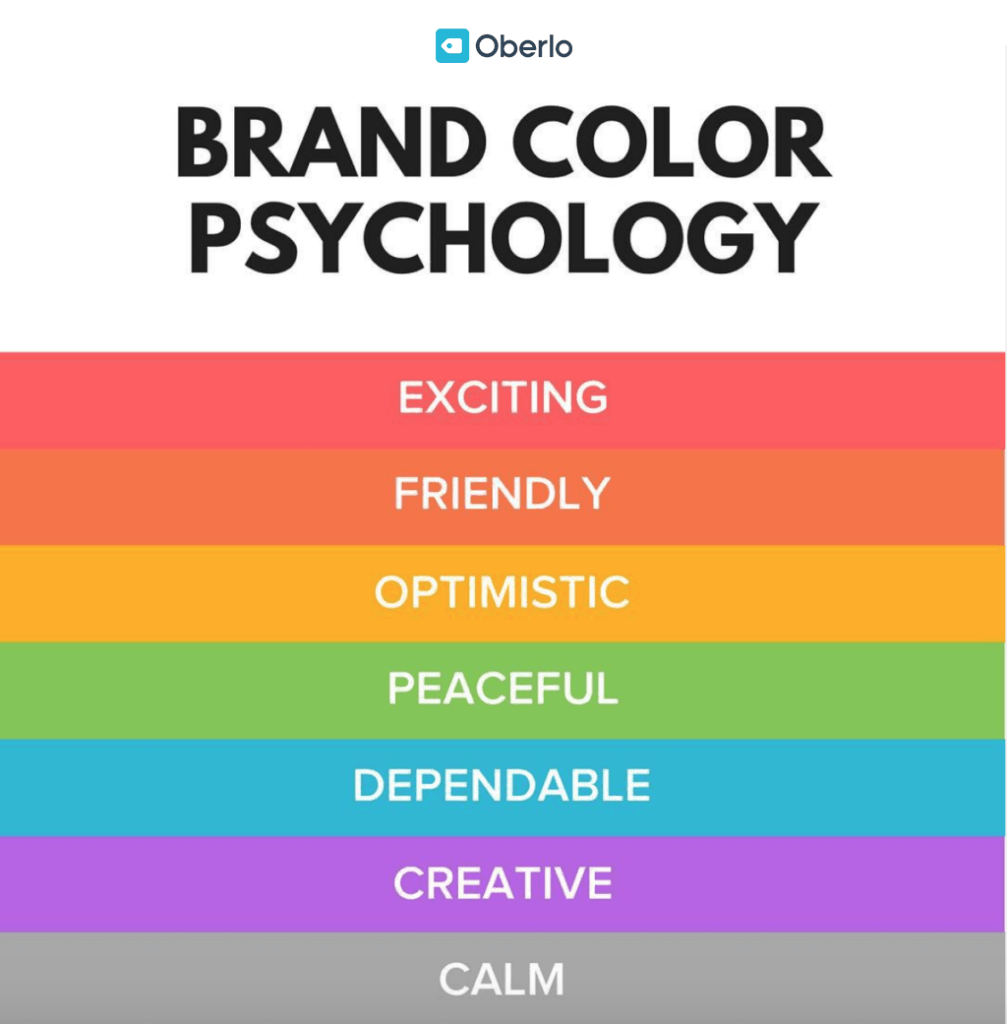
The different color shows different emotion in our daily life. In modern society, different colors give us different signals. For example, red makes people feel enthusiastic.

In UX design, the designer needs to ensure the end-user and brand represents at first. What is the user like? Which colors are suited to this brand represents?

Here is the meanings behind colors which i get from internet to avoid misuse of color.

Reference: Chanka, P, 2018, Color basics and psychology, viewed by 18th April <https://uxdesign.cc/color-effect-b78fae8bb72f>

Testing

Testing in UX design also called usability testing. It is one of the most important part in the UX design.

What is the usability testing?

Usability testing is the process of test your design outcome. The point is to focus on what the user does and not what the user said. It always needs to repeat the test until the design outcomes are not confusing anymore, and the scene meets the designer’s requirements.

Why we need usability testing?

1 Check the design is matching business decisions.
2 Check the design is flowing the user’s experience or not.
3 Get user reactions and feedback
4 Find the problem, delete unnecessary elements.

Tools

There are many design software which can help designer do the usability testing, like Figma and inVision. Build Prototypes with Interactions and Animations is available in both Figma and inVision. For example, the designer can create hotspots for different buttons in one page, and make those connected with other pages.

Reference: Experience ux, n,d, What is usability testing?, viewed by 18th April, <https://www.experienceux.co.uk/faqs/what-is-usability-testing/>

The connection i made for my app in Figma

The animation link below:

https://www.figma.com/proto/u2bbHViW5B4DtHxi741F1c/xiaohanLi?node-id=3%3A6&scaling=min-zoom

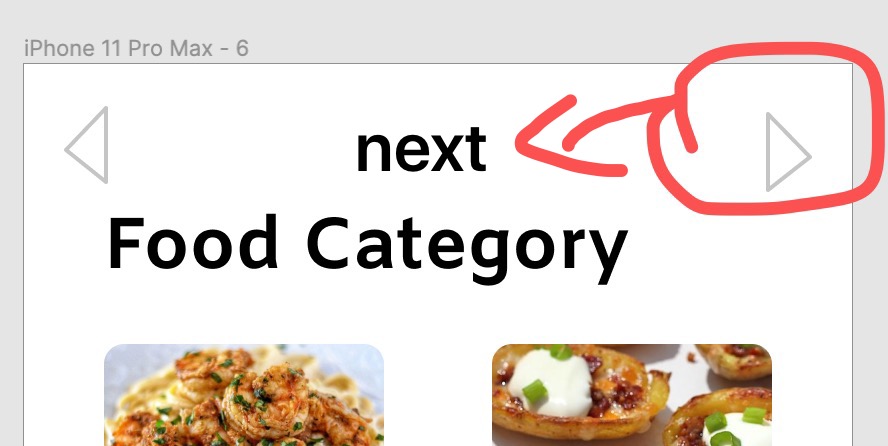
During the process of usability testing, I find the button “Next” is useless. Because we you click the image or words button, it will automatically jump to another page, you don’t need to click the “Next” button. So I deleted all the “Next” buttons.

next button

Prototyping and reflection (Week 7)

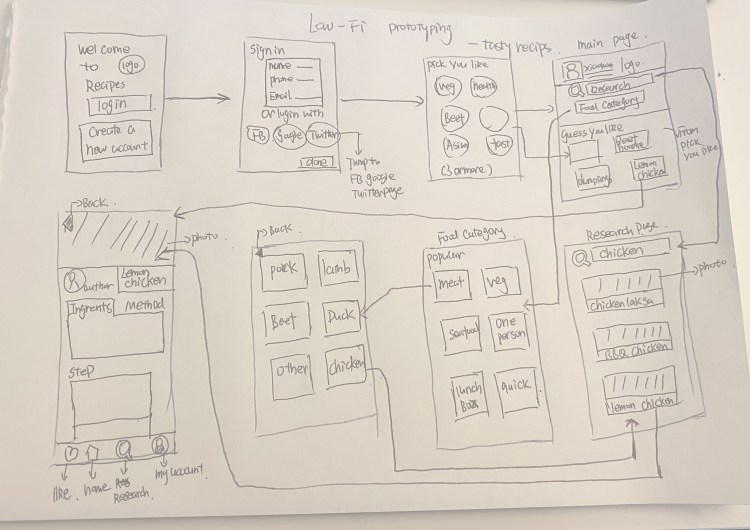
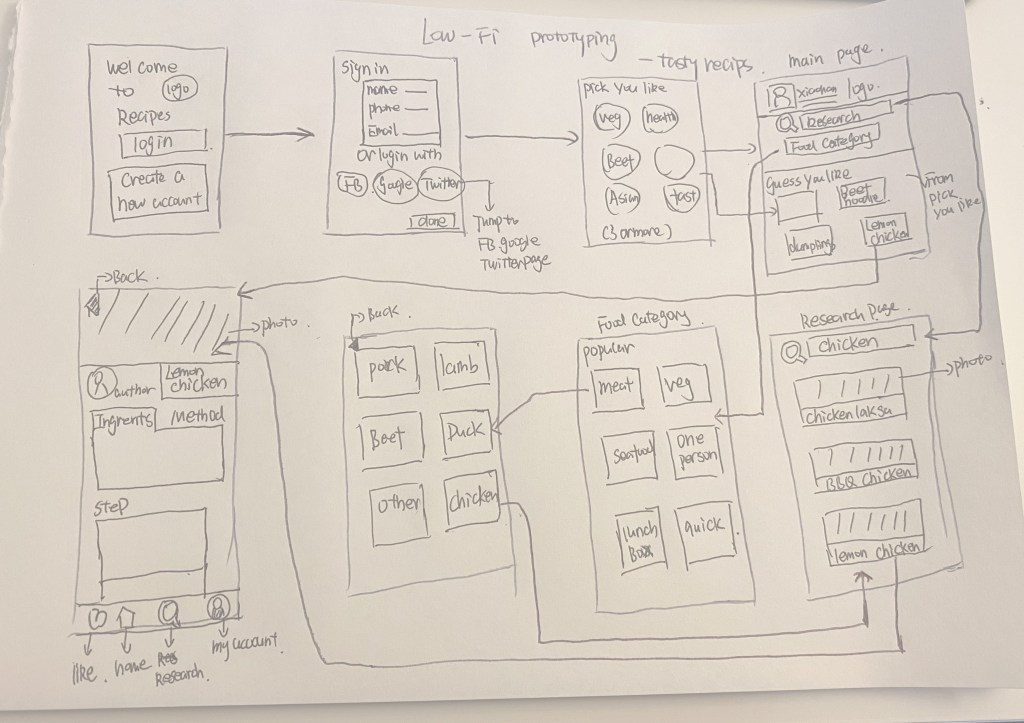
Last week I created Low-fi prototyping for my App – tasty recipes and upload it to discussion forums on canvas.

Like this

That is a very basic Low- fi prototyping, there’s a lot of unfinished parts.

Problem:

The feedback Suggested I consider some users who don’t want to sign in at first, maybe they want to sign in as register as a visitor at first. That is a good suggestion, I didn’t think about it before. So I developed this function on my high-fi prototyping page.

The aim I design this app is to provide such a platform for everyone to communicate and share the delicious recipes they have. Everyone can be a recipe provider and learner. However, if the users have any question of these recipes or you want to share the final food from this recipe, this app also has this feature. If the users don’t want to share or ask anything, just sign in as register as a visitor is ok.

1 My ultimate goal is that all users can have their accounts. So how to guide them to register in-app is still a problem.

2 The low-fi prototyping did not show the part of communication and the page for users to upload their delicious recipes. I’m going to keep thinking about how to design these two parts in the future process of design.

High-fi prototyping

Figma is an amazing online tool for UX design. It is easy to use and the user can develop any thing they want to show in app.

Idea for Theme

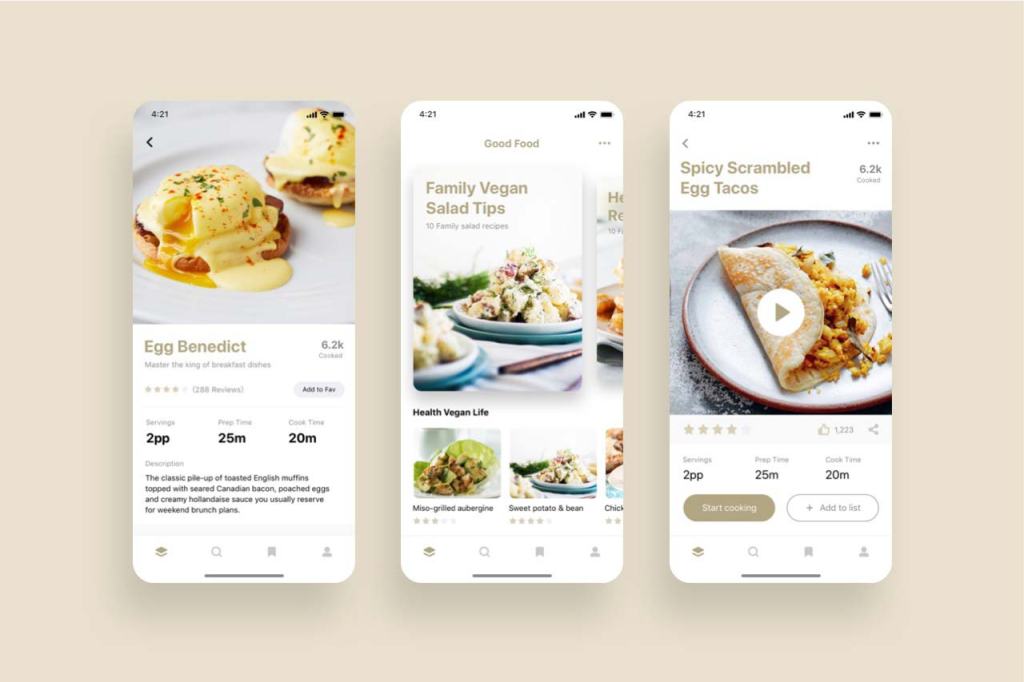
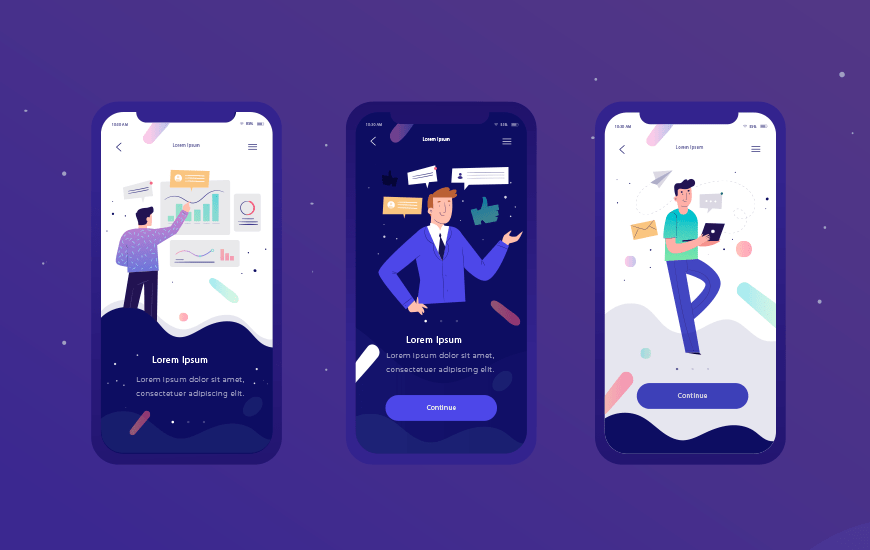
For the recipes’s app, I’d like to use warm colors that are close to the food as the main color. Keep the page nice and clean.

Research

Image From https://www.pinterest.com.au/

High-fi prototyping of the first 3 page

Design process W5

1 What is User-centered Design?

In user-centered design, designers use a mixture of investigative methods and tools (e.g., surveys and interviews) and generative ones (e.g., brainstorming) to develop an understanding of user needs. (Interaction design foundation)

In my opinion, user-centered design is a design process based on the user and the user’s needs. The design team will focus on the user’s needs within each design step, from techniques to final visual outcome.

Reference: Siang Teo, Y. (2020). What is Interaction Design? , viewed by 27th March <https://www.interaction-design.org/literature/article/what-is-interaction-design>

2 What is Interaction design?

Interaction Design is a Part of User-centered design. Interaction design is the interaction process between the user and the product. Interaction design aims to ensure that users can get a good user experience in this interaction process.

A good user-centered design needs to consider the whole process of user experiences, not only the interaction process.

Reference: n,d, What is User Centered Design?, viewed by 27th March <https://www.interaction-design.org/literature/topics/user-centered-design>

3 UX Mapping

What is UX Mapping?

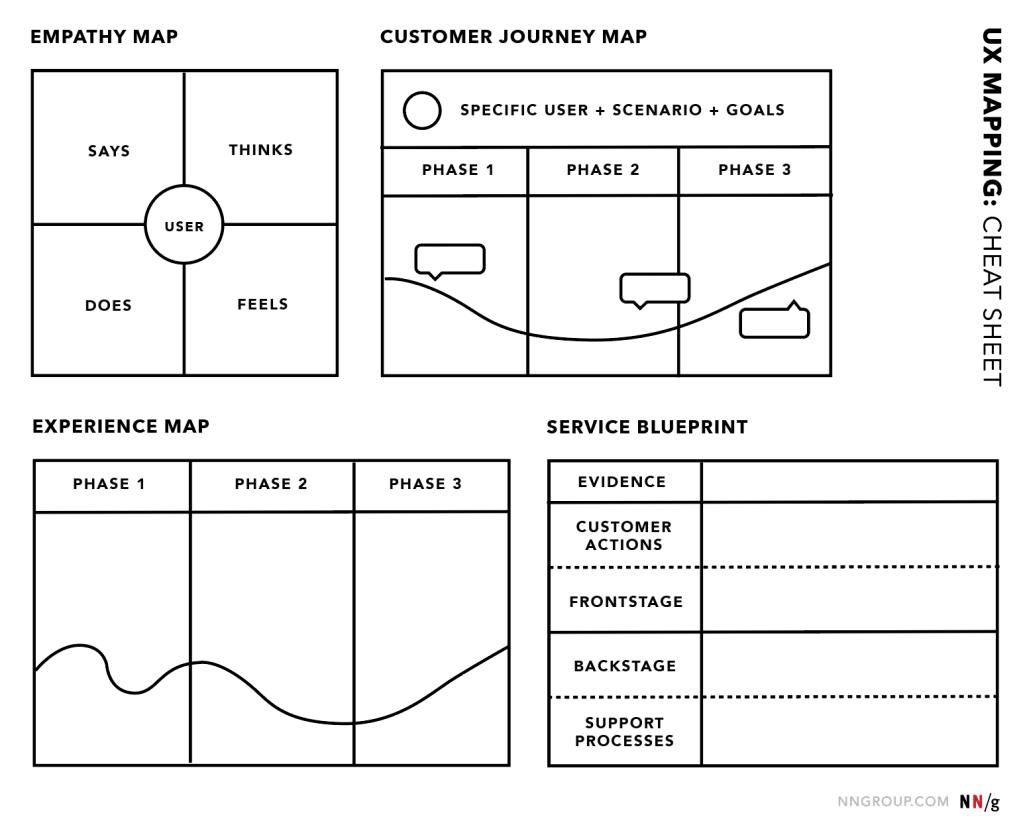
UX Mapping also called user experience mapping. It is a great tool, aims to help the designers realize the user experience in more detail. Nowadays, people tend to collect data to solve some problem. It is work, but sometimes it may loss of contact between users. That the reason why we tend to UX Mapping in the design’s process.

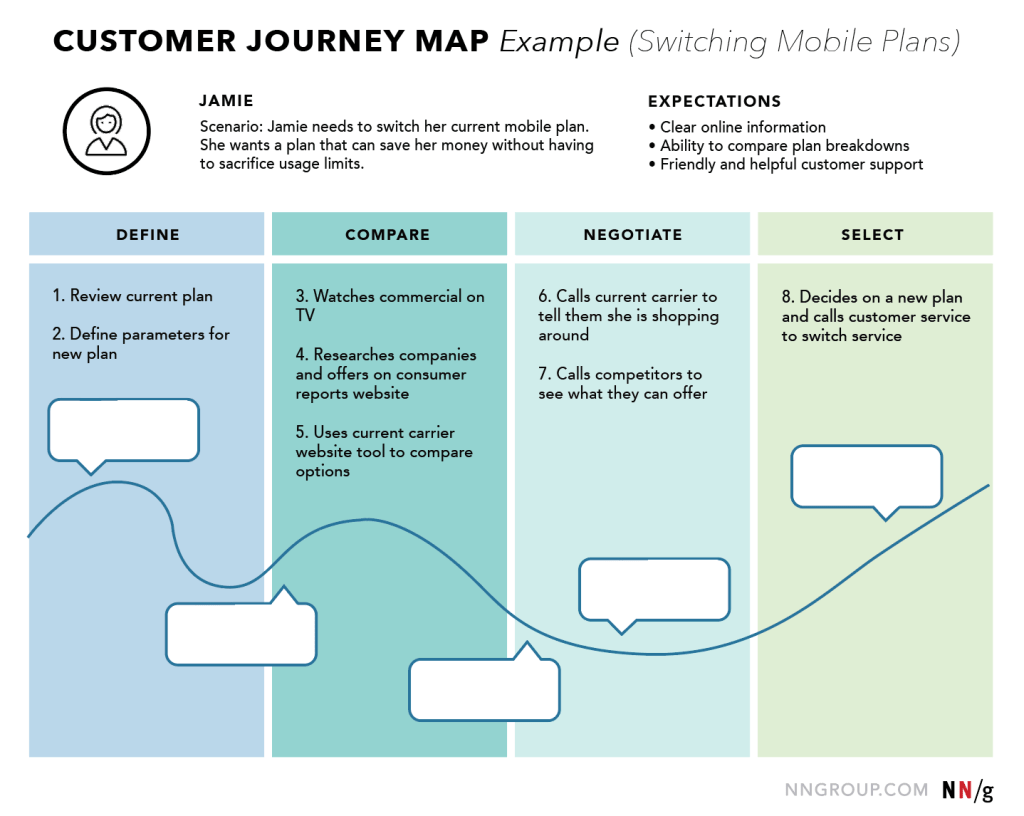
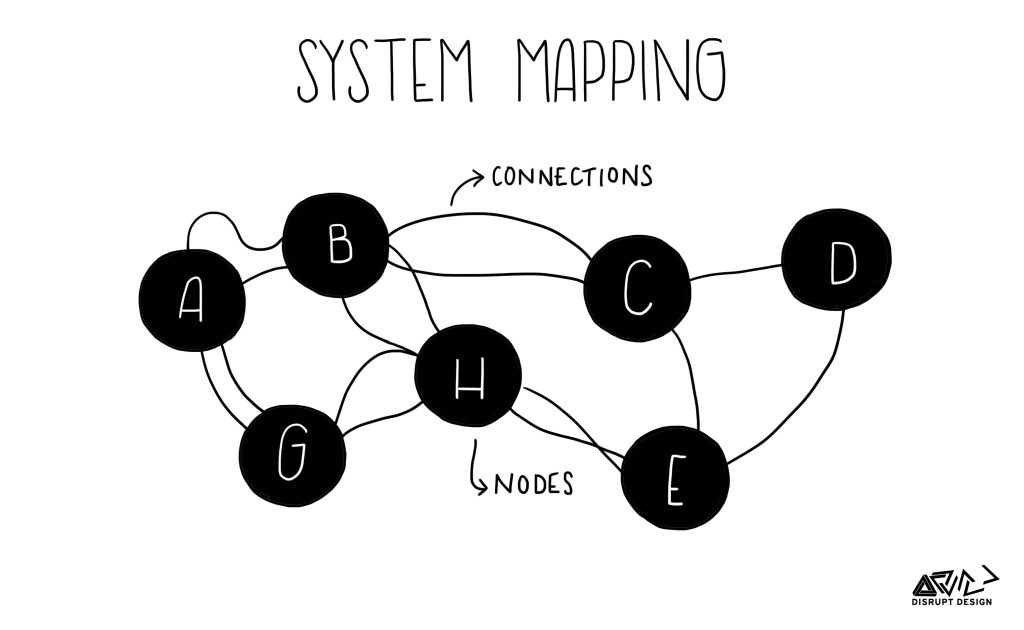
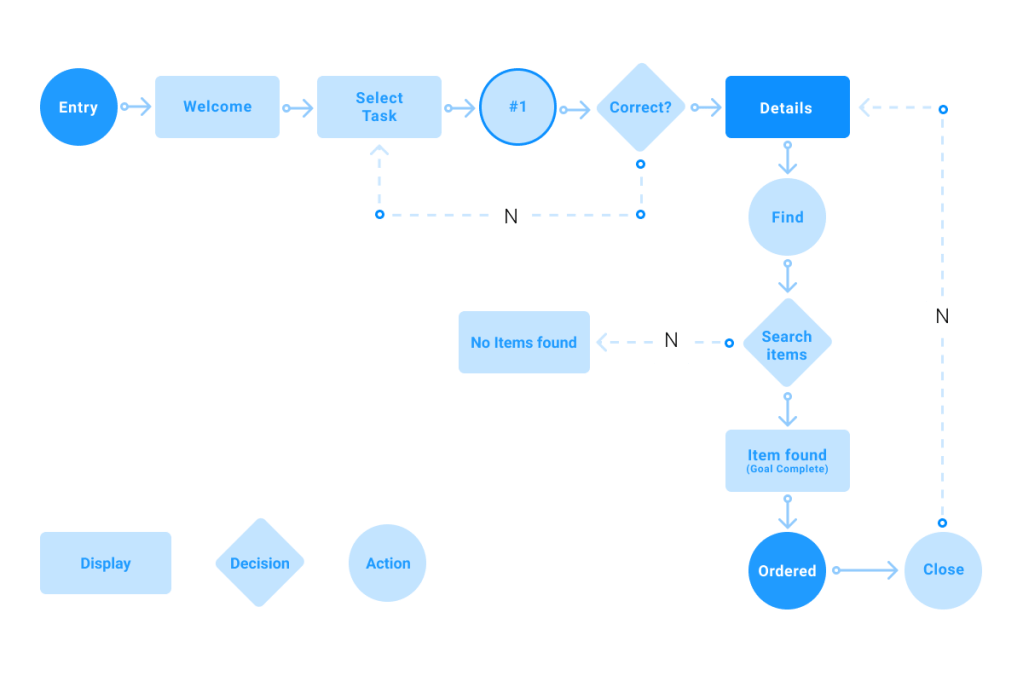
There are 4 types of UX mapping

  • System Mapping
  • Journey Mapping
  • User Flow
  • Empathy Mapping

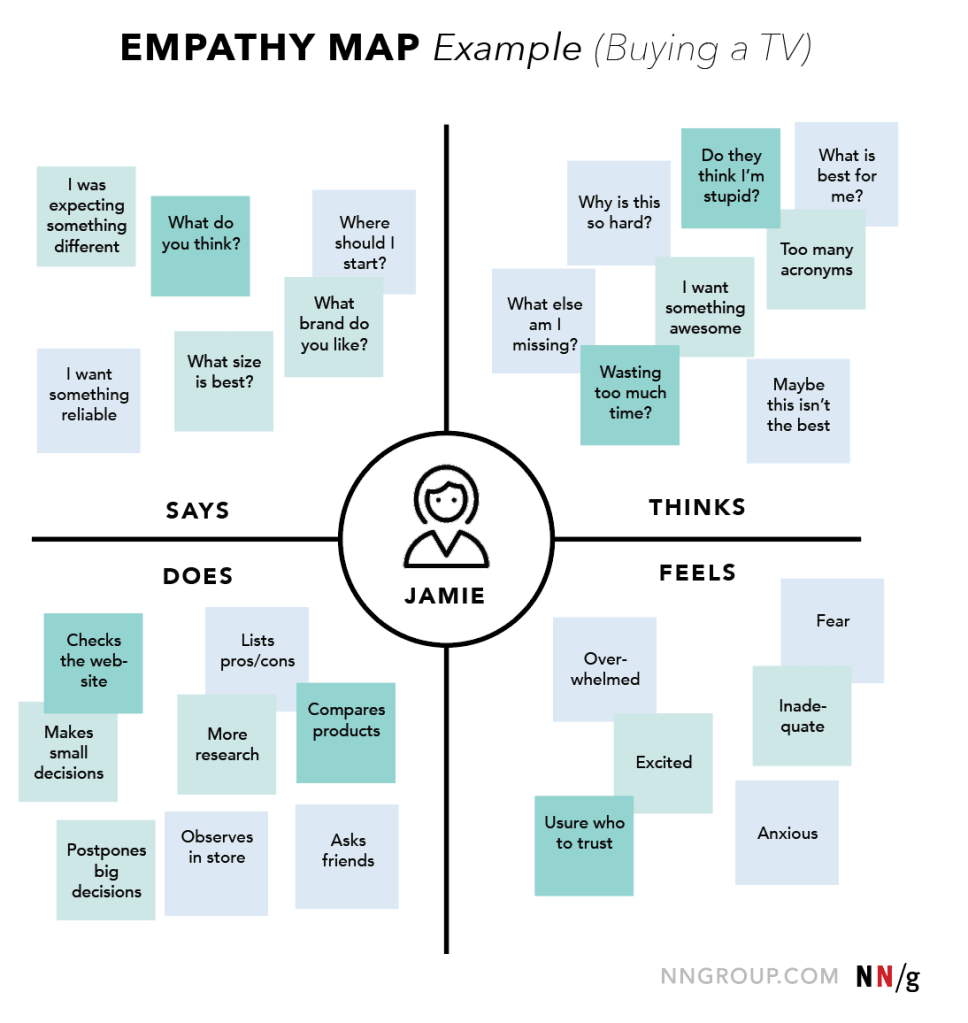
Empathy mapping

There are 4 parts of Empathy mapping, Says, Thinks, Feels, Does. It’s like a little market research. Using this map can accurately understand the customer’s empathy. How do they feel?How do they think?How will they do?One empathy mapping is only for one persona.

Journey Mapping

Journey mapping is a map which recorded the whole process by a particular business or product is achieved. It is split into 4 stages: phases, actions, thoughts, mindsets/emotions. It can help developers pinpoint users, and ensure the work between each part of developers.

Reference: Gibbons, S. (2017). UX Mapping Methods Compared: A Cheat Sheet. viewed by 27th March <https://www.nngroup.com/articles/ux-mapping-cheat-sheet/>

System Mapping

The system mapping like a brain storm. It is chaotic and diverse. What we do in system mapping is to find out / write down the elements, agents, actors, nodes, components (whatever you want to call the parts you place on the page) on paper. Find the connection of each part and try to explore the insight. Find more possible things.

Reference: Leyla, A. (2017). Tools for Systems Thinkers: Systems Mapping, viewed by 27 March,<https://medium.com/disruptive-design/tools-for-systems-thinkers-systems-mapping-2db5cf30ab3a>

User Flow

I think the user flow is the most important part for developer. It shows the whole process in detail. How to start? How to use this app to solve the problems? How to display the different results on each app‘s page?It is the original mode for prototyping.

Reference: CAMREN, B (2019), What Are User Flows In User Experience (UX) Design? viewed by 27 March, <https://careerfoundry.com/en/blog/ux-design/what-are-user-flows/>

4 In-class practice — Design a mobile app that lets people find tasty recipes.

Who is the user?

People who love to cook, Housewife, International student, Chief, Coronavirus people who need to self-isolation at home…….

What are their needs?

Different kinds of recipes, Detailed cooking steps, Ingredient, The forum helps users communicate and share…

How will they meet their needs?

By using the different functions of the app, such as the search box, User interface, collection, etc.

What stages/steps are needed?

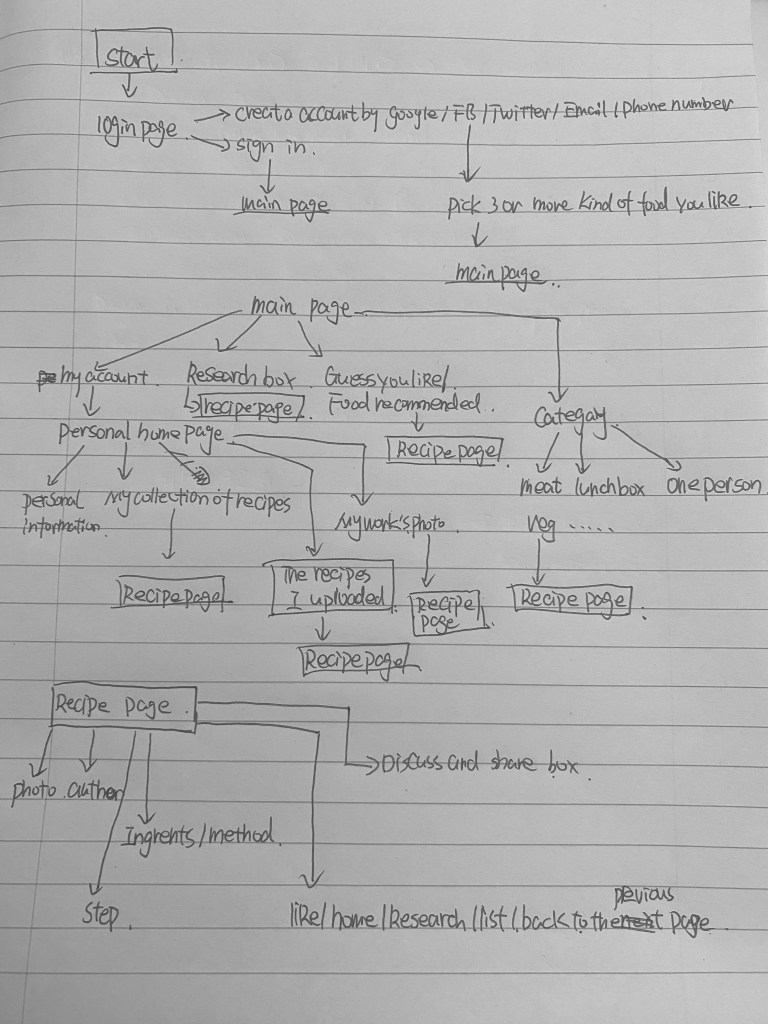
Login – pick 3 or more favorite food trend they like – main page – research box/recommended/category – recipes page

(User flow diagram) Draft

Prototyping (W6)

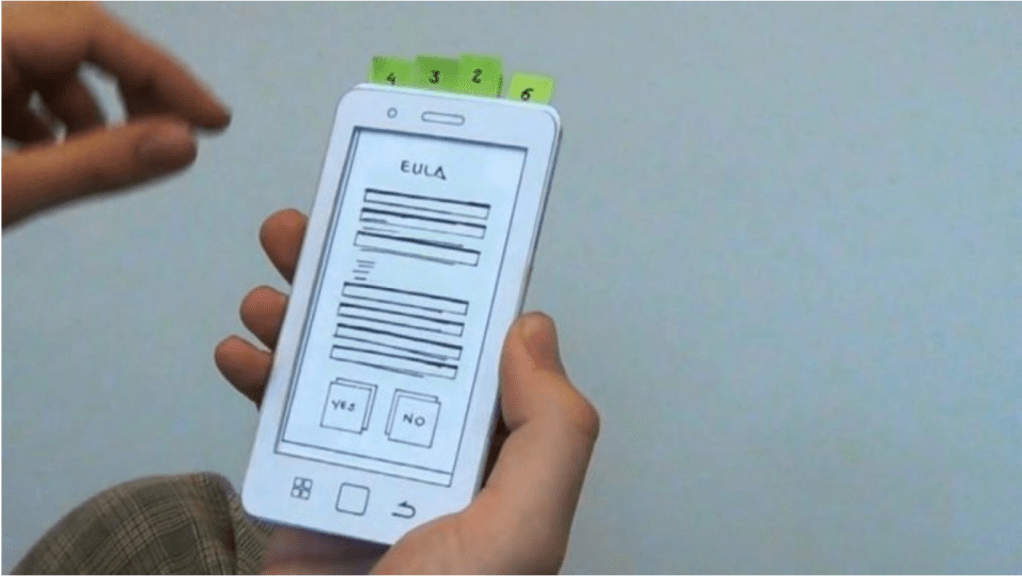
What is prototyping?

Prototyping is an important part of interaction design.

In my opinion, prototyping is a model to express the idea, concept and solution quickly in the design process. There are a lot of different tools to do prototyping, like web tools, drawing sketch, and use the XD…

Using the prototyping can help you test your idea, concept and solution and you can quickly identify problems with your design.

There are many types of prototypes, ranging anywhere between these two extremes:

  • Low-Fi prototyping
  • High-Fi prototyping

Low-Fi prototyping

Low-Fi prototyping is the low quality of prototyping.

It can help people quickly test the function and layout in the design process. The main tools for Low-Fi prototyping is sketch ,PowerPoint ,Keynote ,and DX. It is a fast and easy way, which always can be finished in 5-50min.

High-Fi prototyping

High-Fi prototyping is the high quality of prototyping.

High-Fi prototyping like the mock-up of the final design outcome. It is close to the actual product when people look through it. It contains all the detailed design – interface elements, spacing, and graphics. It also has interactivity, simply from page to page. The main tools for Low-Fi prototyping are PowerPoint, Keynote, and DX. It is good for a designer to present and communicate well with other team members.

Reference: Bikke,F and Yu Siang,T (2020), Design Thinking: Get Started with Prototyping, viewed by 27th March <https://www.interaction-design.org/literature/article/design-thinking-get-started-with-prototyping>

Nick,B (2017), Prototyping 101: The Difference between Low-Fidelity and High-Fidelity Prototypes and When to Use Each, viewed by 27 March <https://theblog.adobe.com/prototyping-difference-low-fidelity-high-fidelity-prototypes-use/>

In-class practice — Design a mobile app that lets people find tasty recipes.

Low-Fi prototyping

Bad design

design is a plan or specification for the construction of an object or system or for the implementation of an activity or process, or the result of that plan or specification in the form of a prototype, product or process. (Wikipedia, 2019). 

In my opinion, the purpose of the design is to make people’s lives more convenient and beautiful. The bad design is not only not beautiful but also make people’s life becomes not aspect.

With this in mind, let’s look at a few bad design examples.

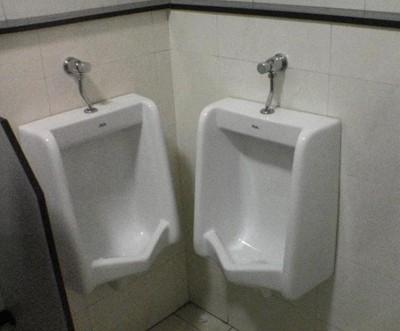
1 Interior design

That’s a bad design. Basically both of these toilets are out of order.

Users:Every male who comes to this toilets

The designer did not consider the user’s habits when he was designing the toilet. Enough space between each toilet should be consider in design process. The bad design is not only inconvenient for users, but also consumes unnecessary human and material costs. It is very important to consider about user’s experience in design.

2 Package design

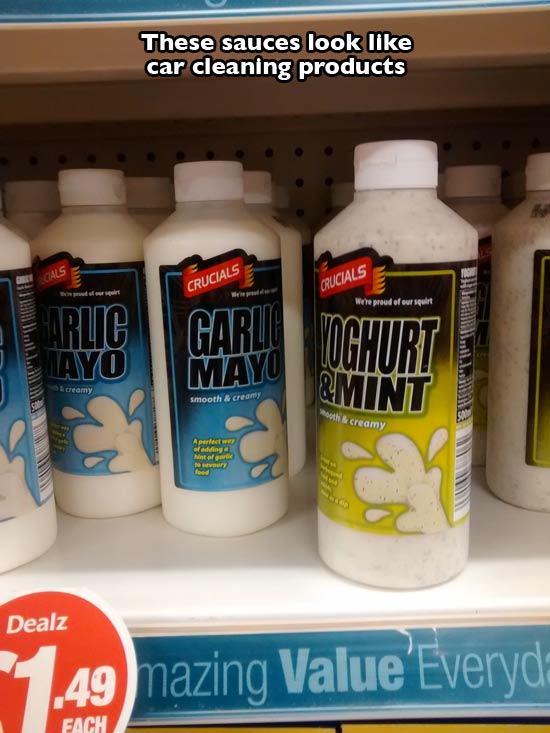
Like the image said:This sauces look like car cleaning products.

Users: All the customers who come to the this supermarket.

This design doesn’t seem to break any design principles, but it doesn’t consider about Stereotypes in consumer behavior.

What is Stereotypes in consumer behavior?

In my opinion, with the development of society, different kinds of goods always have more or less symbol on the packaging design. That is the part of the original branding. The stereotypes in consumer behavior were coming from it. Like brand design for food always use yellow and red, because these two colors are the main food colors.

As a designer, we need to consider about stereotypes in consumer behavior in each project.

3 Graphic design

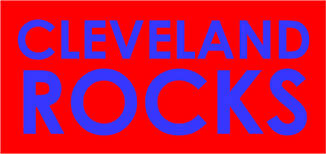
Pic 1: In my opinion, In design with words, the first things need to consider is the reader can see the words clearly. This picture looks really harsh. It is hard to read the words.

In graphic design, the designer needs to consider color collocation. It’s important to look comfortable.

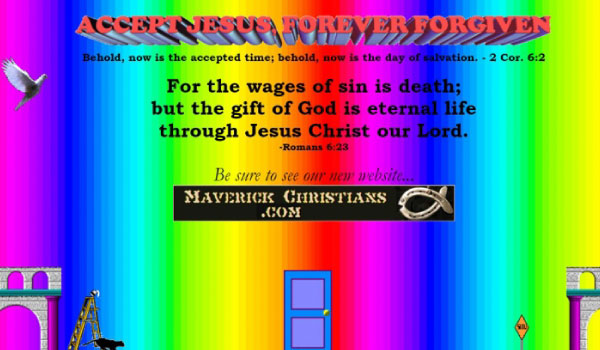
Pic 2: Firstly, pic 2 has the same problem with pic 1, rainbow flash color is not a comfortable choice. Secondly, there are so many different fonts that are used in one image.Different fonts make people look uncomfortable. Thirdly, there are too much unnecessary element in one image. It’s hard for people to understand what this image really means.

Welcome you add more example of bad design…

Reference

1 Jenn David Connolly, 2013,Colors That Influence Food Sales, Jenn David Design, viewed by 2nd March <https://jenndavid.com/colors-that-influence-food-sales/&gt;

2 Wikipedia, 2020, Design, viewed by 29th February <https://en.wikipedia.org/wiki/Design&gt;

3 Wikipedia, 2018, Stereotypes in consumer behaviour, viewed by 29th February <https://en.wikipedia.org/wiki/Stereotypes_in_consumer_behaviour&gt;

4 Jarom McDonald, 2016, 11 hilarious examples of bad design, Lucidpress, viewed by 29th February <https://www.lucidpress.com/blog/11-hilarious-examples-of-bad-design&gt;

5 Cryodragon,2015, A look at websites with bad website design , viewed by 29th February <https://cryodragon.ca/2015/11/22/look-websites-bad-web-design/&gt;

Context and Framing

The only thing can wake me up is design.

– Xiaohan Li

Hi, I’m Xiaohan Li. A passionate Designer.

Things I like about being a designer are creative exploration. Thinking through ideas and coming up with a visual solution and illustration of the ideas. Getting your own idea from daily life. I also like to draw and take nice photos of my daily life.

My Design Skill (The main software i used for design.)

  • Illustrator (For Vector drawing)
  • Photoshop
  • Indesign(For print and presentation)
  • Photo shooting
  • After effect (For 2D cartoon video)
  • Video cut
  • Drawing

In this blog

– The project I do in my university class and my freelance work. I chose my name for this blog because I haven’t been able to come up with a good name.
As a graphic designer, my design process is not as easy as many people think. Firstly, when I get my project brief, I’d like to look at the brief very carefully, highlight the key point which I need to concern about. Secondly, I’d like to research and brainstorm the design element, which could be used in the final design. Also, I’d like to search for some similar design works as a part of my design brainstorm. Considering the concept, target audience, and color is part of the research. These two parts sometimes take more time than others. Thirdly, I’d like to draw some drafts and create a mood board for my design work. After that, I started working on the design. I usually make 2-4 different designs work and pick the best one for the outcome. Finally, I ‘d like to print out or do some digital mock-up for the final design work.
All the design process I will detailedly show in my each design article.

What kind of design works you can see in this blog?

– Package Design

– Publishing & Layout Design

– Branding

– Poster & Billboard & Banner

– GIF & Video

– Interactive Design

– UX & UI Design

– Photographic

Target  audience

Design students /Design companies /Designers
Which I choose to publish on my blog are my favorite works. For each work, I will detail explained the concept, idea and design process. I will also write some essays within my personal opinion in design.

For design students: It doesn’t matter if you’re in your first year or your last year, You might know the general design process, the placement or website where you can get some design information and inspiration, and the software skills from my blog.
For the designer: You can find some different design elements, concepts, briefs and inspiration from my blog which can help you get some useful information in your daily works. You can also find some creative and fun designs on my blog. If you are looking for some Chinese element, welcome to my blog. I’m Chinese, so I always bring some “Chinese style” in my design work.

For design companies: If you are looking for a designer who has a different cultural background. Welcome to my blog and hire me after. You can get my level of design and my preferred design style though my design works.
I’d like to discuss the design works with my audience on the message board.

Three Personas

1

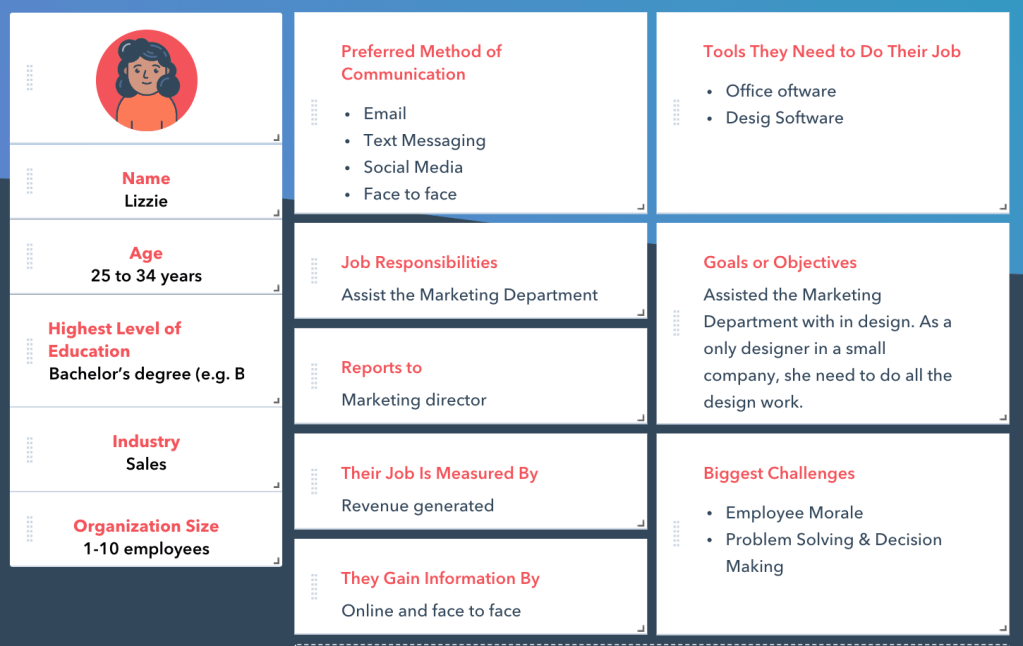
Lizzie is the company’s sole designer and is responsible for assisting in marketing.
Main work contents
– Assist the Marketing Department to make some posters

– Assist the Marketing Department to make some printing materials, such as flyer、business card、booklet…

2

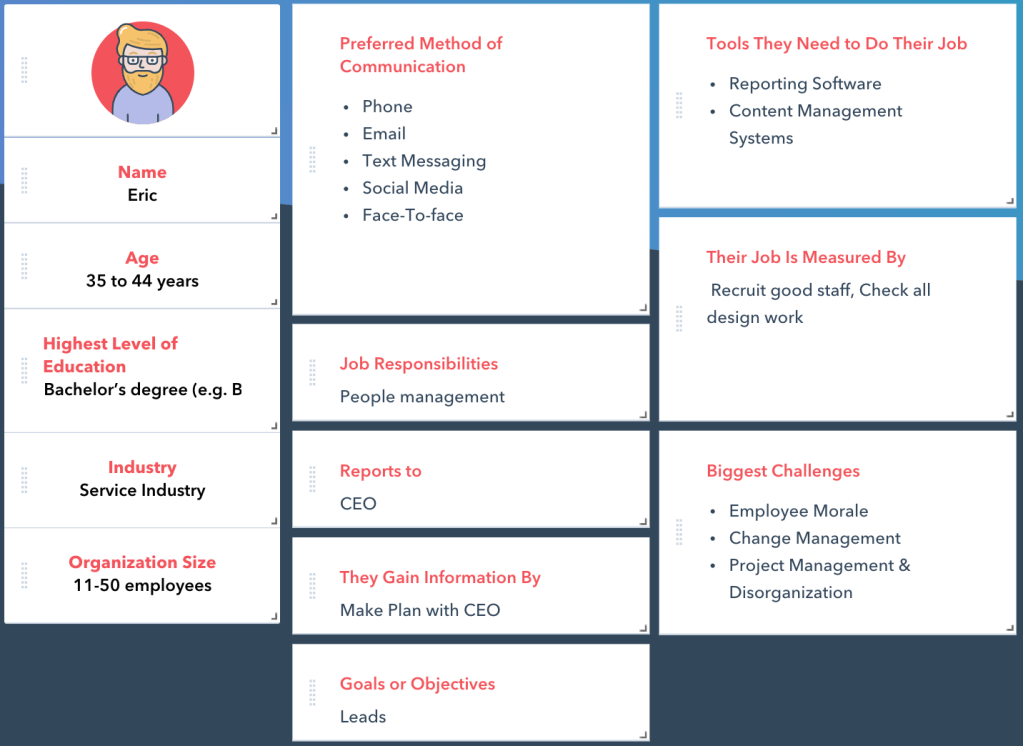
Eric is the art director and HR manager of the whole design company.

Main work contents

Recruit staffs、Check design works

3

Name: Stella Li Age: 18-25

Highest Level of education: Diploma Undergraduate student / Year 2 right now

Major: Visual communication design University: University of Canberra

Preferred method of communication: Facebook/Email/Canvas/Face-to-Face

Tools: Design software/Office software

Report to: Course tutor Goals: Graduate and get a job

Gain information by: Online, Course tutor, Library

Biggest challenge: Design thinking/Concept/Problem solving/design inspiration/Software used

Personas image was getting from: https://www.hubspot.com/make-my-persona

Theme

Website layout style:Clean and Simple

Reason:As a designer, the main purpose of the reason why I create a blog is to let my readers see my works. Keep the whole page clean and simple can help my readers keep their focus on my works. The font I choose for the whole blog is Helvetica, Helvetica or Neue Haas Grotesk is a widely used sans-serif typeface. This font is very easy to read and doesn’t have any special features. In my opinion, it is suited for different stylish designs. I use my favorite color-purple, as the main color in my blog. I plan to create a 4-5 section on my blog’s home page. Each section has 4 square buttons – contains a short brief image of each section work.

There are still far away for me to get that stage (The final blog) . Firstly, I need to create a logo for my blog. Secondly, The related Facebook, Instagram, and maybe youtube page should be update at the same times. Thirdly, I need to create a video about introduce myself and upload in my blog.

At this stage, I cannot create a real stylish website in word press. So I make a layout sketch for my real stylish website. (see below)

Draft style and layout(Sketch style and layout )

Reference

1 Wikipedia, 2020, Design, viewed by 29th February <https://en.wikipedia.org/wiki/Design&gt;

2 Gear, 2019, Helvetica, the World’s Most Popular Font, Gets a Face-Lift, viewed by 29th February <https://www.wired.com/story/helvetica-now/>

3 Sylvia Lewis, 2015, Design Process: Tips from an Expert Graphic Designer, viewed by 29th February, <https://designers.hubspot.com/blog/graphic-designer-design-process-tips>

通过 WordPress.com 设计一个这样的站点
从这里开始