The task that I did is in this semester is to create prototypes and test after for the tasty recipe‘s app. I made my low-fi and high-fi prototype during week 6 to week 11. According to the feedback I get from other people in W7-W8 on discussion form. I redesign and decide the final style of my App. The reflection of my low-fi prototype I have been already published in my blog, see Prototyping and reflection (Week 7)
Today, The main thing I want to discuss is my developed and changed my Hifi-prototype.
The old prototype I did in Figma
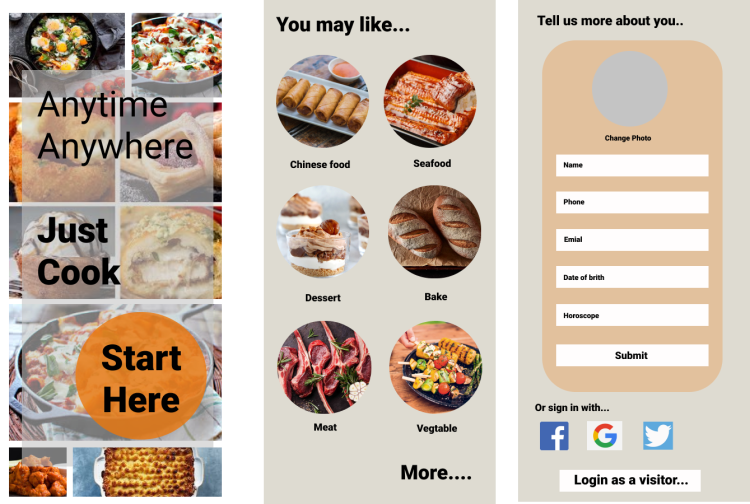
The feedback gives me 4 suggestions.
Firstly, One of the biggest mistakes I made before is I didn’t make the grid. The fact is some part is not clarity. Secondly, on the first page, words are not easy to read. Thirdly, on the last page, there’s something wrong with the logic of the layout. “Login form” should be showed after “sign in with social media” part. Fourthly, the “More” on the second page should be made more like a button.
Changes in design
1 I add one more page “sign in with social media”, between the page “started” to the page “login form”.
2 Created an “account” page as the user’s home page.
3 I decide to change my design style from 3 different parts, which are color, typeface, and button.
Color
For the color, I changed the main background color from gray to simple white. Firstly, the gray background doesn’t apply to a tasty recipe‘s app. Gray is an unemotional color. The color gray is subdued, quiet, and reserved. It does not stimulate, energize, rejuvenate, or excite. That is not fit the design style I made for my app. The design style of my tasty recipe’s is bright, nice, and simple, it can help highlight the food.
Reference: Empowered,d, The Color Gray, viewed by 27th April <https://www.empower-yourself-with-color-psychology.com/color-gray.html>
Typeface
I used a much more bold font in my prototype before. Because I hope the bold can highlight the words. The fact is, if the entire page is in bold, it can not highlight anything and also make the whole page boring. I changed some bold text into a regular size.
Reference: Eugene,S, 2017, Guide to 10 font characteristics and their use in design, viewed by 27th April <https://medium.com/@eugenesadko/guide-to-10-font-characteristics-and-their-use-in-design-b0a07cc66f7>
Button
I shaded a lot of buttons, to make the whole page more realistic and modern. Use shadows combined with gradients and tone variations to show the depth.
Reference: Anastasia,K, 2018,Creating UI shadows that don’t suck, viewed by 27th April <https://medium.com/nyc-design/how-to-make-ui-shadows-that-dont-suck-53827f2f2cb>
The final prototype I did in Figma
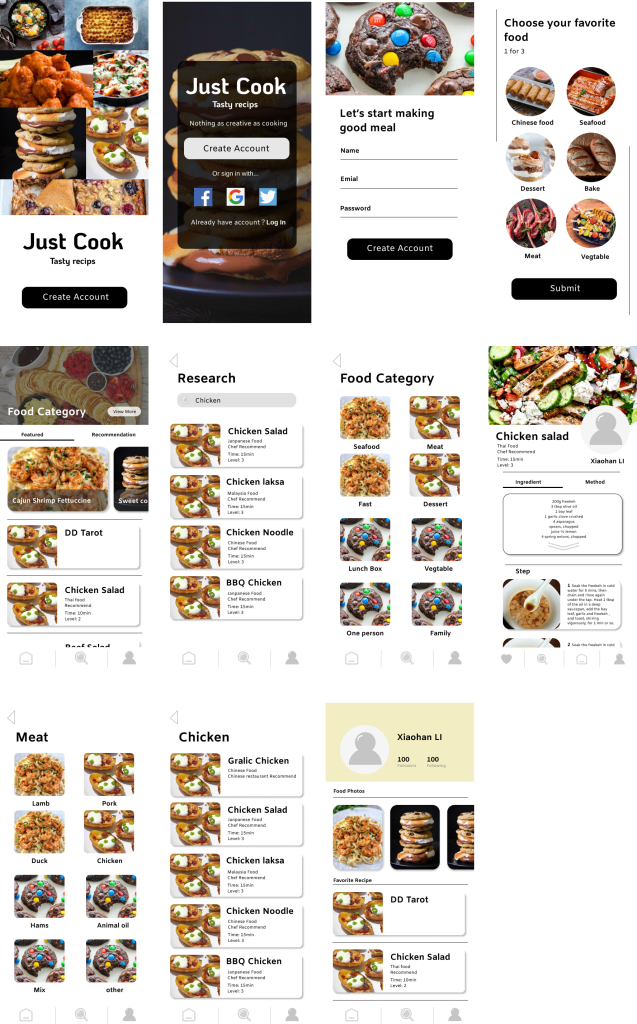
Check out the latest version of my app here.
 lizliz0725info.data.blog